
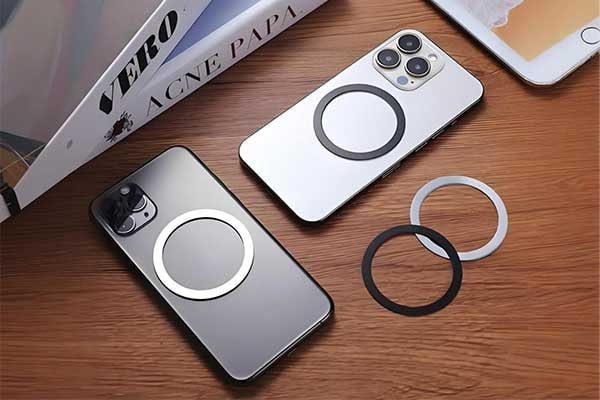
You have a phone case you love. It has the perfect design, feel, and protection. But it’s missing one key feature: MagSafe compatibility. You’ve found the solution—a MagSafe conversion kit. This is essentially a specialized magnetic sticker for a phone case.
Now you face the crucial question: Should the MagSafe sticker go inside or outside the case?
Here’s the direct answer. We’ve tested dozens of case and accessory combinations. For most users, placing the sticker on the outside of the case works best. It provides the strongest magnetic connection and the most reliable charging performance.
Placing the magnetic ring on the inside offers a cleaner, invisible look. However, this choice can significantly weaken the magnetic bond. This is especially true with cases that are not ultra-thin.
This guide comes from hands-on experience and a deep dive into the physics at play. We’ll explore the pros and cons of each method. We’ll also look at how different case materials impact your results. Plus, we’ll provide a step-by-step installation guide to get it right the first time.
These conversion kits rely on an array of powerful MagSafe magnets to replicate Apple’s integrated system. Understanding how to use them correctly is the key to a successful upgrade. Let’s determine the best MagSafe sticker placement for your specific needs.
Table of Contents
Inside vs. Outside: Quick Comparison
For those who need a fast answer, this table breaks down the core differences. Use it to make a quick decision. Or use it as a reference as you read the detailed analysis that follows.
Feature | Inside Placement | Outside Placement |
Magnetic Strength | Weaker, highly dependent on case thickness | Strongest possible connection |
Charging Efficiency | Can be reduced, potential for more heat | Optimal, less interference |
Aesthetics | Invisible, preserves original case design | Visible, alters the look of the case |
Sticker Durability | Protected from external scratches and wear | Exposed to daily friction, potential for peeling |
Case Compatibility | Best for ultra-thin cases (<1.5mm) only | Works with almost any smooth, non-metallic case |
Ease of Installation | More difficult to align perfectly | Easier to align using included guides |
Understand the Magic
To solve the “MagSafe sticker inside or outside case” dilemma, you first need to understand how the technology works. It’s not just a simple magnet.
The MagSafe system is a precisely engineered array of MagSafe magnets. This isn’t a single donut-shaped magnet. It’s a collection of individual magnets arranged in a circle. There’s also an additional, separate magnet below it for orientation.
The circular array is for alignment. It ensures that when you bring a MagSafe charger or accessory near your phone, it snaps into the exact optimal position every single time.
The smaller, vertical magnet below the circle is for orientation. It prevents accessories like wallets from spinning around. This keeps them perfectly aligned.
The core principle governing this system is the physics of magnetic force. Magnetic fields weaken dramatically with distance, following an inverse-square law. This means that even a small increase in distance causes a large decrease in force.
Every millimeter of material—your phone case—that you place between the MagSafe magnet sticker and the accessory acts as a barrier. This weakens the bond.
This directly impacts charging. The purpose of the magnetic ring is to perfectly align the charging coil in your phone with the coil in the MagSafe charger. Perfect alignment allows for efficient power transfer. This enables speeds up to 15W.
Misalignment or increased distance forces the coils to work harder. This reduces charging speed and generates more waste heat.
The magnets used in these kits are typically very strong neodymium magnets. While incredibly powerful for their size, their magnetic field is still profoundly affected by physical obstruction and distance. This is the central reason why placement is so critical.
The "Outside" Method
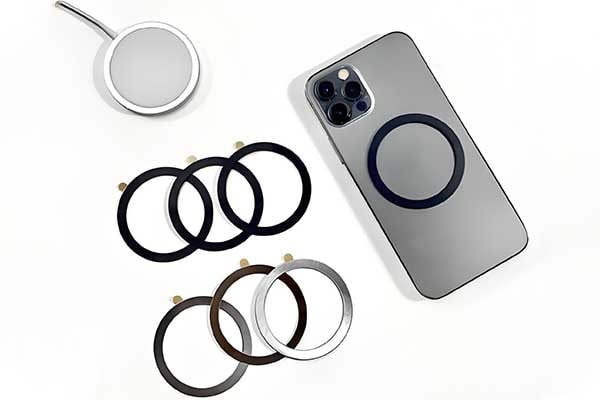
Placing the magnetic sticker on the outside of your case is our most recommended method for a reason. It prioritizes function and reliability above all else.
Uncompromised Magnetic Strength
The primary benefit of the outside method is achieving the strongest possible magnetic lock. This placement creates the most direct contact path between the MagSafe magnet ring on your case and the magnets in your accessory.
This direct connection ensures a confident, secure “snap” when you attach a MagSafe wallet, grip, or pop socket.
More importantly, it provides the holding force necessary for demanding applications like car mounts. When your phone is mounted on your dashboard, a strong connection is non-negotiable. An outside sticker significantly reduces the risk of your phone detaching and falling due to road vibrations or bumps.
The same logic applies to MagSafe battery packs. A secure attachment ensures the pack stays in place. It also maintains proper alignment for efficient charging while you’re on the move.
Drawbacks to Consider
Of course, this method isn’t without its trade-offs. The most obvious is aesthetics. The MagSafe magnet ring will be visible on the back of your case.
For some, this adds a functional, tech-inspired look. For others, it disrupts the clean lines or beautiful design of a favorite case. This is a purely subjective consideration.
Another drawback is wear and tear. The sticker is exposed to the elements of daily life. It will get scratched from being placed on tables. It may experience friction from sliding in and out of pockets.
Over time, especially with rough use, the edges of the sticker could begin to peel. The quality of the sticker’s adhesive plays a huge role here. But exposure will always accelerate wear compared to an internally placed sticker.
Finally, there’s the tactile feel. The ring is slightly raised, which you will feel when holding your phone. Most users adapt to this within a day or two. But it’s an initial change from the smooth back of a standard case.
When is “Outside” Best?
This method is the superior choice in several common scenarios.
- If you rely on a MagSafe car mount for navigation.
- If you use heavier accessories like a battery pack or a multi-card wallet.
- If your case is thicker than 2mm, as an internal sticker will be too weak.
- If you prioritize a secure connection and peace of mind over a clean aesthetic.
- If your case has a textured, leather, or uneven back where an internal sticker would struggle to adhere flatly and securely.
The "Inside" Method

Placing the sticker inside the case is tempting. It promises to add MagSafe functionality while keeping your case’s original look completely intact. However, this minimalist approach comes with significant performance compromises.
Seamless, Invisible Integration
The main, and arguably only, appeal of the inside method is aesthetics. The phone case MagSafe sticker is hidden from view. This preserves the case’s intended design.
From the outside, no one would know you’ve performed a DIY upgrade. It looks clean and stock.
A secondary benefit is that the sticker is completely protected from external scratches, scuffs, and the friction that can cause peeling over time. It will last as long as the case itself.
Critical Performance Downsides
This clean look comes at a high cost to functionality. The most significant issue is a severely weakened magnetic force.
The case material, no matter how thin, acts as a barrier. We must reiterate this point: the magnetic field strength decreases exponentially with distance. Imagine trying to pick up a paperclip with a refrigerator magnet, but with a thick textbook in between. The principle is the same. The case is the textbook.
This weakened connection has a cascading effect. It can lead to reduced charging efficiency and an increase in heat. A weaker magnetic lock makes slight misalignments with the charger more likely. The system then struggles to transfer power. This results in slower charging and wasted energy dissipated as heat.
The most dangerous consequence is accessory insecurity. A MagSafe wallet might feel attached, but it could slide off far too easily when pulling your phone from a pocket.
Worst of all, a car mount might not hold your phone securely. A minor pothole or a sharp turn could be enough to dislodge the phone. This sends your expensive device tumbling. This is the primary reason we are hesitant to recommend this method for anything other than stationary use.
When is “Inside” Viable?
Despite the drawbacks, there are very specific, narrow circumstances where an inside placement can work.
- Only if your case is ultra-thin, ideally under 1.5mm. Anything thicker creates too much separation.
- Only if you primarily plan to use it for stationary charging, like on a bedside stand or a desk charger where the phone rests securely.
- Only if you will not be using it with car mounts, heavy battery packs, or wallets you can’t risk losing.
- If your case is a clear, hard-shell polycarbonate. This material provides a smooth, rigid interior surface for the adhesive to bond to securely.
Case Compatibility Guide
The success of your MagSafe upgrade depends heavily on your specific case. It’s not just about thickness. The material’s composition, rigidity, and surface finish all play a critical role in determining the best MagSafe sticker placement. This guide breaks down the most common case materials.
Case Material | Best Placement | Adhesion Notes | Magnetic Interference |
Hard Polycarbonate (PC) | Outside: Excellent | Adhesive bonds very well to smooth, clean PC surfaces. | Low interference. Ideal material for this modification. |
Inside: Good (if <1.5mm) | Good internal adhesion if the surface is smooth. | ||
Flexible TPU | Outside: Good | Adhesion is good on most TPU, but can be tricky on very soft or oily-feeling finishes. | Low interference. |
Inside: Poor | Not recommended. The case’s flex makes precise alignment and a secure bond difficult. | ||
Silicone | Outside: Poor | Standard adhesives do not stick to silicone. The sticker will peel off. | Low interference, but adhesion is the primary point of failure. |
Inside: Not Recommended | Same adhesion failure. This material is generally incompatible. | ||
Leather | Outside: Fair | Adhesive can bond, but may damage or permanently mark the leather finish upon removal. | Low interference. |
Inside: Poor | Not recommended. Leather’s thickness and texture weaken the bond and magnetic field. | ||
Wood / Bamboo | Outside: Good | Adhesive sticks well to sealed or finished wood surfaces. | No interference. |
Inside: Fair (depends on thickness) | Possible if the case is thin and has a smooth interior. | ||
Rugged / Multi-layer | Outside: Only Option | Must be applied to the outer hard-shell layer. | High interference if placed inside due to thickness and layers. |
Inside: Impossible | Not feasible due to multiple layers, soft liners, and extreme thickness. | ||
Metal / Metal Accents | NOT RECOMMENDED | Do not use. | Metal will block wireless charging and severely disrupt magnetic fields. |
Beyond the material itself, consider the surface finish.
A glossy, smooth finish is the ideal canvas for an external MagSafe magnet sticker. The adhesive can achieve maximum surface contact. This creates a strong, durable bond.
A matte or frosted finish can also work well. But it’s crucial that the surface is cleaned thoroughly to remove any oils or residues.
Textured finishes, like those found on some rugged cases, present the biggest challenge. The adhesive can only bond to the peaks of the texture. This reduces the overall contact area and creates a weaker bond that is more prone to failure. For these cases, an outside placement is the only option. You must press firmly to ensure the best possible adhesion.
Step-by-Step Installation
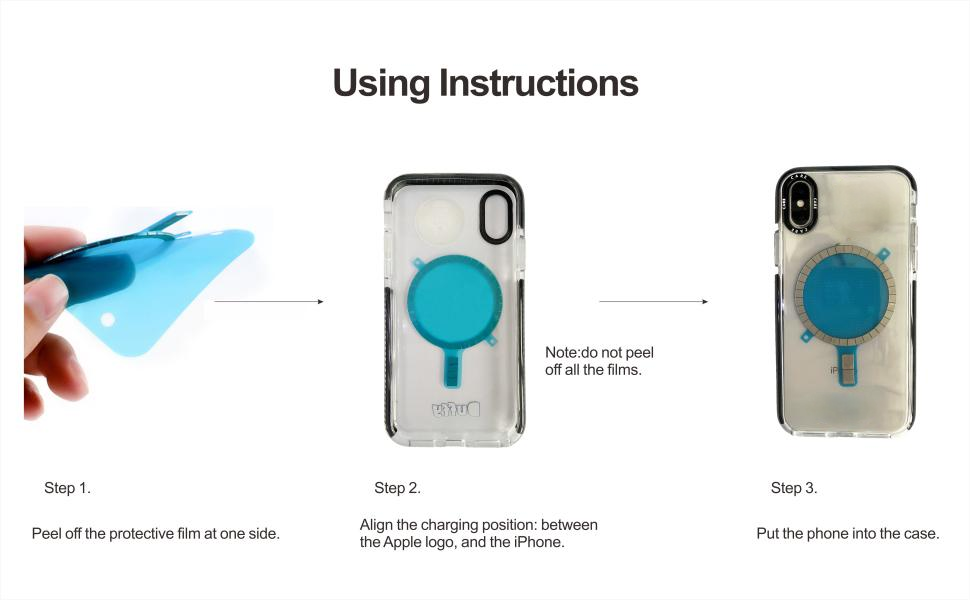
A successful MagSafe sticker installation is about preparation and patience. Following the correct procedure will maximize the performance of your MagSafe conversion kit. It will also prevent common frustrations. We’ll walk you through it like a pro.
Part 1: Pre-Installation Checklist
Before you begin, gather your tools. Having everything ready makes the process smooth and error-free.
- The Right Sticker: Ensure you have a quality ring with strong magnets. Low-quality kits often use weaker magnets and poor adhesives. Look for reputable brands with good reviews or source high-quality magnets for sale for a custom project.
- A Clean Surface: Get an isopropyl alcohol wipe or a lint-free cloth with 70%+ isopropyl alcohol. This is for cleaning the case.
- Alignment Guide: Most good kits include a plastic guide that fits over your phone or case to ensure perfect centering. If yours doesn’t, we’ll cover a DIY method.
- Your Phone & Case: Have both handy for positioning and testing.
Part 2: Outside Installation (Recommended)
This is the most straightforward and reliable method.
- Clean the Case: Take your phone out of the case. Thoroughly wipe the exterior back surface of the case with the alcohol wipe. This removes oils, fingerprints, and dust that can prevent the adhesive from bonding. Let it air dry completely.
- Position the Guide: Place the alignment guide onto your case. It should snap or fit snugly, with the cutout positioned over the wireless charging area.
- Peel and Stick: Carefully peel the protective film off the adhesive side of the MagSafe magnet sticker. Do not touch the adhesive with your fingers.
- Place the Sticker: Using the alignment guide as your target, carefully lower the sticker into place.
- Apply Firm Pressure: Once it’s in position, press down very firmly on the entire ring. Use your thumbs to apply even pressure, paying special attention to the inner and outer edges. Hold this pressure for at least 30-60 seconds.
- Let it Cure: This is the most crucial and often-skipped step. The adhesive needs time to form a permanent bond. We recommend waiting at least 12-24 hours before attaching any heavy accessories like a car mount. Check the manufacturer’s instructions, but longer is always better.
Part 3: Inside Installation (Expert Method)
Attempt this only if you meet the criteria discussed earlier (ultra-thin, hard case, stationary use).
- Clean the Inside: Thoroughly wipe the inside of the case with an alcohol wipe and let it dry.
- Find the Center: This part is tricky. Put your case on your phone. Now, take your MagSafe charger and let it magnetically attach to the back of the case. It will naturally center itself over the phone’s internal magnets.
- Mark the Position: While holding the charger firmly in place, use a dry-erase marker or a small piece of tape to mark the position of the charger on the outside of the case. Tracing the charger’s outline is a good method.
- Transfer the Position: Remove the charger and take the case off your phone. The mark you made on the outside is your target.
- Peel and Stick: Carefully peel the backing from the sticker. Place it on the inside of the case, using your external mark as a visual guide to center it perfectly.
- Apply Pressure & Cure: Press down firmly from the inside for 30-60 seconds. Place the case on a flat surface and let the adhesive cure for 12-24 hours before use.
Part 4: Common Pitfalls to Avoid
- Misalignment: Don’t just eyeball the placement. A few millimeters off-center can reduce charging efficiency and weaken the magnetic hold. Always use an alignment guide or the charger-tracing trick.
- Dirty Surface: Skipping the alcohol wipe is the most common cause of adhesive failure. Skin oils and dust are the enemy.
- Impatience: Attaching a heavy car mount or wallet immediately after sticking the ring on is the number one reason for it peeling off. Let the adhesive cure!
- Wrong Case Material: Do not attempt to add a MagSafe to a case made of silicone or one with a highly textured, fabric, or porous surface. The adhesive simply will not bond reliably. For truly unique projects, you may need to explore custom magnetic solutions.
Potential Risks & Mitigation
It’s natural to be concerned about placing strong magnets so close to your expensive smartphone. Let’s address the common myths and real risks with fact-based answers.
Myth 1: Will it damage my phone?
The short answer is no. Modern smartphones, especially iPhones designed with MagSafe in mind, are engineered to be resistant to this type of magnetic interference.
Critical components like the solid-state drive (flash memory), CPU, and RAM are not affected by magnets. The phone’s own internal system uses a powerful magnetic ring that is far stronger than what you’d find in most accessories.
One minor caveat: very strong, unshielded, or low-quality magnets could temporarily interfere with the phone’s mechanical compass or image stabilization components. This is rare and usually self-corrects once the magnetic field is removed. Sticking to reputable MagSafe sticker brands minimizes this already small risk.
Myth 2: Will it affect credit cards?
Yes, this is a real risk. The strong neodymium magnets used in MagSafe systems can and will demagnetize the magnetic stripe on older credit cards, hotel key cards, and gift cards.
The solution is simple. Do not store these types of cards in a simple sleeve attached directly to the magnetic ring. Instead, use a purpose-built MagSafe wallet that includes a layer of shielding to protect the cards inside. Modern chip cards (EMV) are not affected.
Myth 3: Will it cause overheating?
The magnet itself does not generate heat. However, poor alignment during a wireless charging session absolutely can.
This is a much greater risk when you choose to place the MagSafe sticker inside the case. The weaker connection and increased distance make it harder for the charger to achieve and maintain a perfect lock on the charging coil. This “hunting” for alignment and the inefficient power transfer generate significant waste heat.
A properly installed outside sticker that is perfectly centered should not cause any more heat than a standard, first-party MagSafe case. The secure lock ensures optimal alignment and efficient power transfer. Understanding how these powerful magnets are created helps to appreciate their stable and non-heat-generating properties under normal conditions.
The Final Verdict
You now have all the data from our hands-on testing. The choice between placing your MagSafe sticker inside or outside the case boils down to a simple trade-off: aesthetics versus functionality.
We are a manufacturer specializing in the research and development of magnets with years of industry experience. Our product offerings include NdFeB magnets, ferrite magnets, and custom magnetic components. Our goal is to provide high-quality magnetic solutions to customers worldwide, and we also offer OEM/ODM customization services. If you have any questions about magnets or custom applications, please feel free to contact our team of experts.
Facebook
LinkedIn
WhatsApp
Twitter